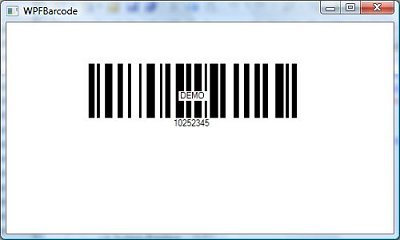
Using SmartCodeDeveloper to Create Barcode Images in a Windows Presentation Application (WPF)
This tutorial demonstrates the creation of a WPF application using SmartCodeDeveloper. The BMP image returned by SmartcodeDeveloper is used as an image source for the WPF image control.
Pre-requisites
The .Net Framework 3 SDK and its Visual Studio 2005 extension has to be already installed on your machine.SDK for Windows Vista and .NET Framework 3.0
Visual Studio 2005 extensions for .NET Framework 3.0
Steps
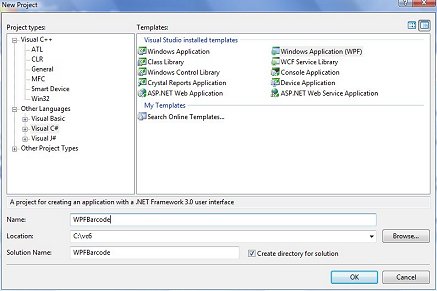
1) To get started, go to File::New Project in Visual Studio 2005, and select Windows Application (WPF). Name the project WPFBarcode.
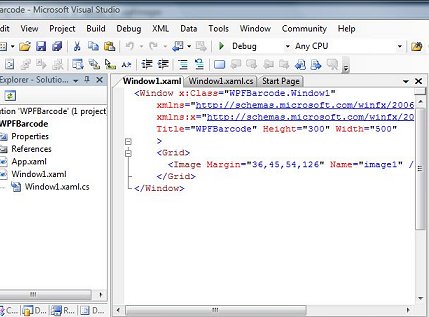
2) We will now add an Image control to our form to host the barcode. Open the Window1.xaml file using the XML Editor. Make changes to this file so that the Width of the window is now 500. Insert the image control <Image Margin="36,45,54,126" Name="image1" /> within the <Grid> ... </Grid> tags.
The XAML file should now look like this
xmlns="http://schemas.microsoft.com/winfx/2006/xaml/presentation"
xmlns:x="http://schemas.microsoft.com/winfx/2006/xaml"
Title="WPFBarcode" Height="300" Width="500" >
<Grid>
<Image Margin="36,45,54,126" Name="image1" /> </Grid>
</Window>
3) Next, we will add code to the Window1.xaml.cs file so that a barcode will be drawn when the window loads. Copy the block of code below to the Window1.xaml.cs file.
The DrawBarcode method uses the SmartCodeDeveloper control to create a BMP image in an array of bytes.
The array of bytes is then passed through a BmpBitmapDecoder and converted to a BitmapSource, which is used to set the Source property of the Image control (image1).
{
InitializeComponent();
DrawBarcode();
}
void DrawBarcode()
{
TechnoRiver.SmartCodeDeveloper.SmartCodeDeveloperControl scd = new TechnoRiver.SmartCodeDeveloper.SmartCodeDeveloperControl();
scd.BarcodeData = "10252345";
scd.Symbology = TechnoRiver.SmartCodeDeveloper.SmartCodeDeveloperControl.BarcodeSymbology.CODE128;
scd.DisplayText = TechnoRiver.SmartCodeDeveloper.SmartCodeDeveloperControl.BarcodeDisplayText.Yes;
byte[] imgbyte = scd.GetImageBMP();
System.IO.MemoryStream ms = new System.IO.MemoryStream(imgbyte);
BmpBitmapDecoder decoder = new BmpBitmapDecoder(ms, BitmapCreateOptions.PreservePixelFormat, BitmapCacheOption.Default);
BitmapSource bs = decoder.Frames[0];
image1.Source = bs;
}
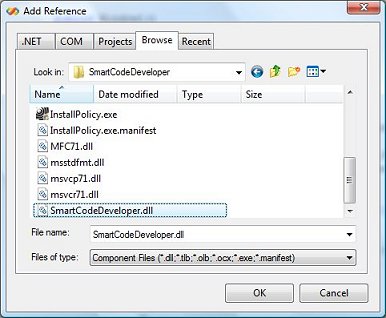
3) Add a reference to SmartCodeDeveloper. Right click on the WPFBarcode project and select Add Reference.
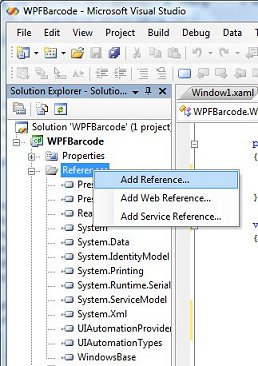
4) Click the Browse Tab and navigate to SmartCodeDeveloper.dll. The default location for the dll is at C:\Program Files\TechnoRiver\SmartCodeDeveloper\SmartCodeDeveloper.dll
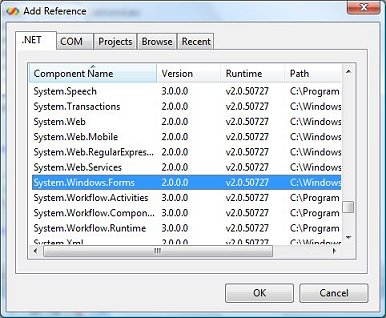
5) Add a reference to System.Windows.Forms.
6) We are now ready to run the WPF application. The result should look as follows.