TechnoRiverStudio
SmartCodeDrivers
SmartCodeComponent
SmartCodeDeveloper
SmartCodeWebControl
Free Barcode Software
TechnoRiver MICR Font
TechnoRiverGraphics
Barcode Font
Using the Aeromium Library with Barcode Fonts
TechnoRiver partners with Aeromium to resell its high quality and professional barcode fonts
The Aeromium DLL transforms text characters into barcodes for your .NET projects using barcode fonts.
The steps are as follows
1. Add the Aeromium DLL (AeromiumBarcodeLibrary.dll) to your .NET project.
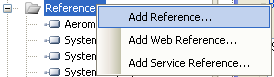
2. Use the namespace Net.BarcodeFonts.Aeromium to refer to the Aeromium Barcode Library.
For C#
using Net.BarcodeFonts.Aeromium;
VB.Net
Imports Net.BarcodeFonts.Aeromium
3. Create an instance of the AeromiumBarcodes class and adjusts its properties.
List of properties
BarcodeSymbology - the symbology to encode, for example, Code128 or EAN13
InputText - the data to be encoded.
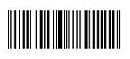
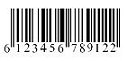
ExtendedStyle - If ExtendedStyle is turned on, some bars will be longer than the rest. Barcodes that supports this property include ISBN13, ISBN, ISSN, EAN13, EAN8, UPCE, UPCA.
|
|
|
Non Extended
|
Extended
|
CheckDigit - if set to yes, will automatically append a check digit the barcode. The check digit is an extra digit or character used by the scanner to verify the data. For some barcodes, the check digit is mandatory, while for others the check digit is optional. This property is used by barcodes that check digits are optional . They include Code 39, Code 39 Extended, Industrial 2 of 5, I2of5, ITF14 and Modified Plessy.
For Example
AeromiumBarcodes acode = new AeromiumBarcodes();
acode.BarcodeSymbology = AeromiumBarcodes.BarcodeEnum.Code39;
acode.InputText = "1234567";
acode.CheckDigit = AeromiumBarcodes.YesNoEnum.Yes;
4. Invoke the generate() method to create the barcode
acode.generate();
5. Retrieve the output string with the EncodedOuput property. The EncodedOuput is the actual text that can be set with the appropriate barcode font and change into a barcode.
string encodedstr = acode.EncodedOuput;
6. Set the output string with the corresponding font. For example, if you are creating the Code39 Barcode, you will need to set the output string to the barcode font FontCode39H3 or FontCode39H3_TR (Trial font)
Font barcodefont = new Font("FontCode39H3_TR", 26);
textbox.Text = encodedstr;
textbox.Font = barcodefont;
7. Optionally retrieve the human readable text using the HumanText property. The human readable text is a text string that is usually drawn below the barcode to help people manually read the value in case the barcode cannot be processed by the scanner.
string humantext = acode.HumanText;
8. Optionally retrieve the EANText property if the barcode is ISSN, ISBN or ISBN13. These barcodes have an extra text string that is drawn above them.
Examples in C#
Examples of using Aeromium Barcode Library in a .NET 2 C# project.
using Net.BarcodeFonts.Aeromium;
//Code39 Example
AeromiumBarcodes acode = new AeromiumBarcodes();
acode.BarcodeSymbology = AeromiumBarcodes.BarcodeEnum.Code39;
acode.InputText = "1234567";
acode.CheckDigit = AeromiumBarcodes.YesNoEnum.Yes;
acode.generate();
string encodedstr = acode.EncodedOuput;
Font barcodefont = new Font("FontCode39H3_TR", 26);
textbox.Text = encodedstr;
textbox.Font = barcodefont;
//EAN13 Example
AeromiumBarcodes acode = new AeromiumBarcodes();
acode.BarcodeSymbology = AeromiumBarcodes.BarcodeEnum.EAN13;
acode.InputText = "12345678";
acode.ExtendedStyle = AeromiumBarcodes.YesNoEnum.Yes;
acode.generate();
string encodedstr = acode.EncodedOuput;
Font barcodefont = new Font("FontCodeEANEH3_TR", 26);
textbox.Text = encodedstr;
textbox.Font = barcodefont;
//Code128 Example
AeromiumBarcodes acode = new AeromiumBarcodes();
acode.BarcodeSymbology = AeromiumBarcodes.BarcodeEnum.Code128_Auto;
acode.InputText = "123456789";
acode.generate();
string encodedstr = acode.EncodedOuput;
Font barcodefont = new Font("FontCode128H3_TR", 26);
textbox.Text = encodedstr;
textbox.Font = barcodefont;
Note : The recommended size for the barcode font is 26, but it can be larger or smaller.
Note : textbox is a .NET TextBox with the properties Multiline set to True and WordWrap set to False
Example in VB.Net
Imports Net.BarcodeFonts.Aeromium
'EAN13 Barcode with no ExtendedStyle
Dim acode As AeromiumBarcodes
Dim encodedstr As String
Dim barcodefont As Font
acode = New AeromiumBarcodes()
acode.BarcodeSymbology = AeromiumBarcodes.BarcodeEnum.EAN_13
acode.InputText = "123456789"
acode.ExtendedStyle = AeromiumBarcodes.YesNoEnum.No
acode.generate()
encodedstr = acode.EncodedOuput
barcodefont = New Font("FontCodeEANH3", 26)
TextBox1.Font = barcodefont
TextBox1.Text = encodedstr
Note : The recommended size for the barcode font is 26, but it can be larger or smaller.
Note : textbox is a .NET TextBox with the properties Multiline set to True and WordWrap set to False
Back to Aeromium
|

















 TechnoRiverStudio
is one of the most innovative and productive label design and
print tools available. It is currently being used by
many Fortune 500 companies including hospitals, universities,
manufacturers, retailers, municipalities, and government
institutions in many different countries around the
world.
TechnoRiverStudio
is one of the most innovative and productive label design and
print tools available. It is currently being used by
many Fortune 500 companies including hospitals, universities,
manufacturers, retailers, municipalities, and government
institutions in many different countries around the
world.